

- Joined
- Aug 9, 2025
- Messages
- 89
- Reaction score
- 0
- Points
- 6
Dear EpicMyko Players;
Our server's ‘Item Linking’ is as follows. We present our game to you, our esteemed players, with all our best efforts for you to play our game enjoyable, smoothly and easily.
You need to use the [Shift + Right Click] function to link items.
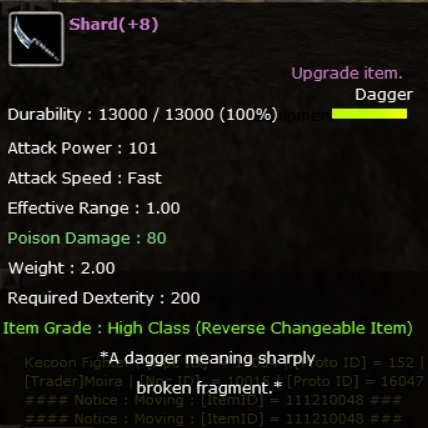
You can link the items on Inventory, VIP and Magic Bag to the Chat or Whisper window with the [Shift + Right Click] command.
After linking, a link will appear with the item details.
If there are Chat and Whisper windows on the screen at the same time, the link will be sent to the last window you used.
If you use the ‘ Backspace ’ key after the link appears, the link will be deleted.
When the mouse is moved away from the link, the item details will disappear.
The font and colour of the item details differ according to the item's grade.
Duration details of timed items are not shared on the link.
Cypher Ring does not support this feature.
Our server's ‘Item Linking’ is as follows. We present our game to you, our esteemed players, with all our best efforts for you to play our game enjoyable, smoothly and easily.
You need to use the [Shift + Right Click] function to link items.
You can link the items on Inventory, VIP and Magic Bag to the Chat or Whisper window with the [Shift + Right Click] command.
After linking, a link will appear with the item details.
If there are Chat and Whisper windows on the screen at the same time, the link will be sent to the last window you used.
If you use the ‘ Backspace ’ key after the link appears, the link will be deleted.
When the mouse is moved away from the link, the item details will disappear.
The font and colour of the item details differ according to the item's grade.
Duration details of timed items are not shared on the link.
Cypher Ring does not support this feature.